Joomla WCAG 2.2 and ADA Compliance: What Core Gives You and What You Must Fix
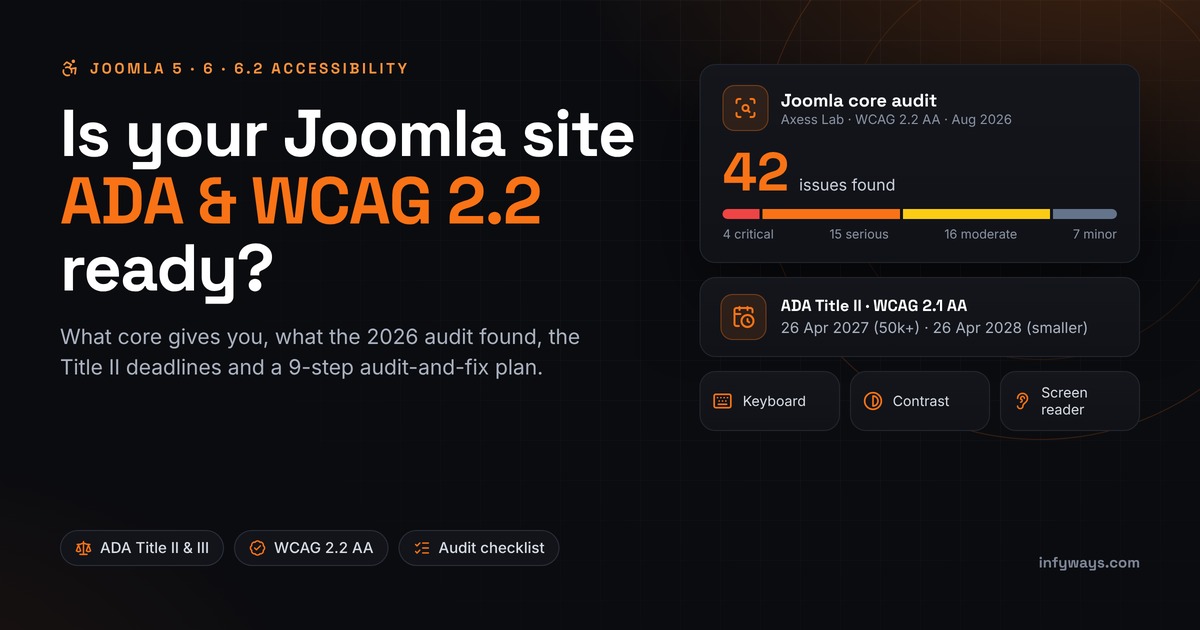
Short answer: no CMS is ADA compliant out of the box, and Joomla is no exception. Joomla 5 and 6 aim for WCAG 2.1 AA, ship a default template built with accessibility in mind (Cassiopeia) and include a built-in checker (jooa11y). Even so, an independent WCAG 2.2 AA audit of Joomla core, released in August 2026, found 42 issues. For US state and local governments, the ADA Title II rule requires WCAG 2.1 AA by 26 April 2027 or 26 April 2028, depending on population. Whether your site passes depends mostly on what sits on top of core: your template, your extensions and your content.
In this guide: a quick answer, what WCAG 2.2 adds, what Joomla core covers and what the 2026 audit flagged, the ADA rules for public entities and businesses, a 9-step audit-and-fix process, the tools to use, the truth about overlays and "ADA plugins", and an FAQ. Selling to Europe? Read our European Accessibility Act guide as well. This article is general information, not legal advice.
Is Joomla ADA and WCAG compliant? The quick answer
| Question | Short answer |
|---|---|
| Is Joomla ADA compliant out of the box? | No CMS is. Joomla core aims for WCAG 2.1 AA. Your template, extensions and content decide whether your site meets it. |
| Is Joomla WCAG 2.2 compliant? | Not yet. The August 2026 Axess Lab audit found 42 WCAG 2.2 AA issues in core, with 27 success criteria failed. The Joomla project is now planning and merging fixes. |
| Which standard should I target? | WCAG 2.1 AA is the legal standard under the Title II rule. Build to WCAG 2.2 AA, which also covers 2.1 AA. |
| When are the ADA Title II deadlines? | 26 April 2027 for public entities with 50,000+ people. 26 April 2028 for smaller entities and special district governments. |
| Will a plugin make my site compliant? | No single plugin will. Checkers find issues and helpers patch some of them, but people still have to test and fix. |
| What should I do first? | Audit each page type, fix problems at the source, then re-test after every update. |
What does WCAG 2.2 AA mean for a Joomla site?
The Web Content Accessibility Guidelines (WCAG) are the W3C standard behind almost every accessibility law. They sit under four principles, known as POUR. Content must be Perceivable (alt text, captions, enough contrast), Operable (everything works with a keyboard, with no traps and enough time), Understandable (clear labels, predictable navigation, helpful error messages) and Robust (clean markup that assistive technology can read). Level AA means meeting every Level A and AA success criterion. AA is the level that laws, regulations and settlements usually point to.
WCAG 2.2 became a W3C Recommendation on 5 October 2023. It adds nine success criteria to WCAG 2.1. Six of them are Level A or AA, so they count toward AA conformance; the other three are AAA. WCAG 2.2 also removes 4.1.1 Parsing as obsolete. Apart from that, the 2.1 criteria are unchanged, so building to 2.2 AA also covers the 2.1 AA standard in the Title II rule. Here are the six new A/AA criteria and where Joomla sites usually trip:
| New criterion (level) | What it asks | Where Joomla sites trip |
|---|---|---|
| 2.4.11 Focus Not Obscured (Minimum), AA | A focused element must not be completely hidden by content you added. | Sticky headers, cookie banners and chat bubbles covering the focused link. |
| 2.5.7 Dragging Movements, AA | Anything done by dragging must also work with a single click or tap. | Drag-only sliders and sortable lists. The audit flagged drag-only article reordering in Joomla's own admin list. |
| 2.5.8 Target Size (Minimum), AA | Click targets at least 24×24 CSS pixels, or spaced far enough apart. | Tiny social icons and close buttons. The audit measured a 20×20 px remove icon in core forms. |
| 3.2.6 Consistent Help, A | Help options (contact details, chat, FAQ link) stay in the same relative order on every page. | Contact links or chat widgets that move between templates and menu layouts. |
| 3.3.7 Redundant Entry, A | Don't make people type the same information twice in one process. | Checkout and booking forms that ask for the address again. |
| 3.3.8 Accessible Authentication (Minimum), AA | No memory test or puzzle to log in unless there's an alternative or help. | Login forms that block paste or password managers, and puzzle CAPTCHAs with no alternative. |
The full WCAG 2.2 table and copy-paste template fixes are in our European Accessibility Act guide, so we won't repeat them here.
What does Joomla core give you, and what must you fix yourself?
Joomla has made accessibility a priority since version 4. The Joomla Accessibility Project puts it carefully: Joomla "currently aims for WCAG 2.1 AA conformance since Joomla 4, but this has never been independently validated." This table shows where core helps, where the 2026 audit found gaps in core itself, and what stays your job.
| Area | What core gives you | Gaps the 2026 audit found in core | Your responsibility |
|---|---|---|---|
| Templates | Cassiopeia (site) and Atum (admin), both built with accessibility as a goal | No skip link in Cassiopeia by default; current-menu and focus indicators below 3:1 contrast; undefined focus styles in Atum | Third-party templates, page builders, child templates, overrides and any colours you change |
| Content editing | Alt-text fields with a decorative-image option; the jooa11y checker in the article editor | Media Manager not usable by keyboard (critical); editor can disappear while scrolling on small viewports (critical) | Real alt text, heading order, link text, captions and tagged PDFs in every article |
| Forms and login | Core login, registration and multi-factor authentication (MFA) | Calendar date picker not keyboard or screen-reader accessible; password rules not tied to the field; MFA QR code without alt text (critical) | Contact, booking and checkout extensions, CAPTCHAs and error messages |
| Interaction | Core Skip-To plugin (on for the administrator by default) and the "Additional Accessibility Features" visitor toolbar | Inaccessible tooltips; dialogs don't return focus; sessions time out without warning | Menus, sliders, popups, cookie banners, chat widgets and maps |
| Admin screens | Atum accessibility settings for backend users | Extension list not usable by keyboard (critical); low-contrast checkboxes | Matters if staff with disabilities manage your site |
A quick fix for the skip link: the core Skip-To plugin is enabled for the administrator by default and can also be switched on for the site. You can do that under System → Plugins, or add a "Skip to main content" link in a Cassiopeia child template.
What did the 2026 independent audit of Joomla find?
Open Source Matters commissioned an independent audit from Axess Lab as Milestone 1a of the Joomla Accessibility Project, which is funded through the Sovereign Tech Fund. Eric Eggert tested Joomla in July and August 2026 against WCAG 2.2 Level AA, and the audit report was released on 17 August 2026. The scope covered Atum, Cassiopeia, login and MFA, the Media Manager, the installer and update flows, backend list and edit views, frontend user forms, and configuration and permissions.
- 42 issues: 4 critical, 15 serious, 16 moderate and 7 minor, plus one best-practice suggestion.
- Success criteria: 27 failed, 17 passed, 8 not applicable and 3 not tested.
- The four critical issues: the Media Manager, the editor vanishing on small viewports, the extension list not working by keyboard, and an MFA QR code with no text alternative.
- Recurring themes: keyboard operation, contrast, tooltips, dialog focus and session time-outs.
- The auditor's verdict: the number of findings is "better than average for a project like this".
A separate audit against ATAG 2.0, the guidelines for authoring tools, found five issues. It matters if your editors have disabilities, because Joomla is the tool they use to create content. The Joomla Community Magazine summary covers both audits.
What happens next? Milestone 1b runs from 1 September to 31 October 2026 and is listed as in progress on the project milestones page. It covers a prioritised remediation backlog and quick-win fixes merged into Joomla core. The Joomla feature tracker also lists WCAG 2.2 AA compliance for Joomla 6.x as in planning. Joomla 6.2, released on 13 October 2026, is the latest version. Check each release's notes for which audit fixes have shipped. Until a fix lands in the version you run, that gap is yours to work around.
What does the ADA require for websites?
The Americans with Disabilities Act covers state and local governments (Title II) and businesses open to the public (Title III). According to the Department of Justice, it has "consistently taken the position" that the ADA applies to web content since 1996. What changes between the two titles is how specific the technical rules are.
Title II: state and local government websites
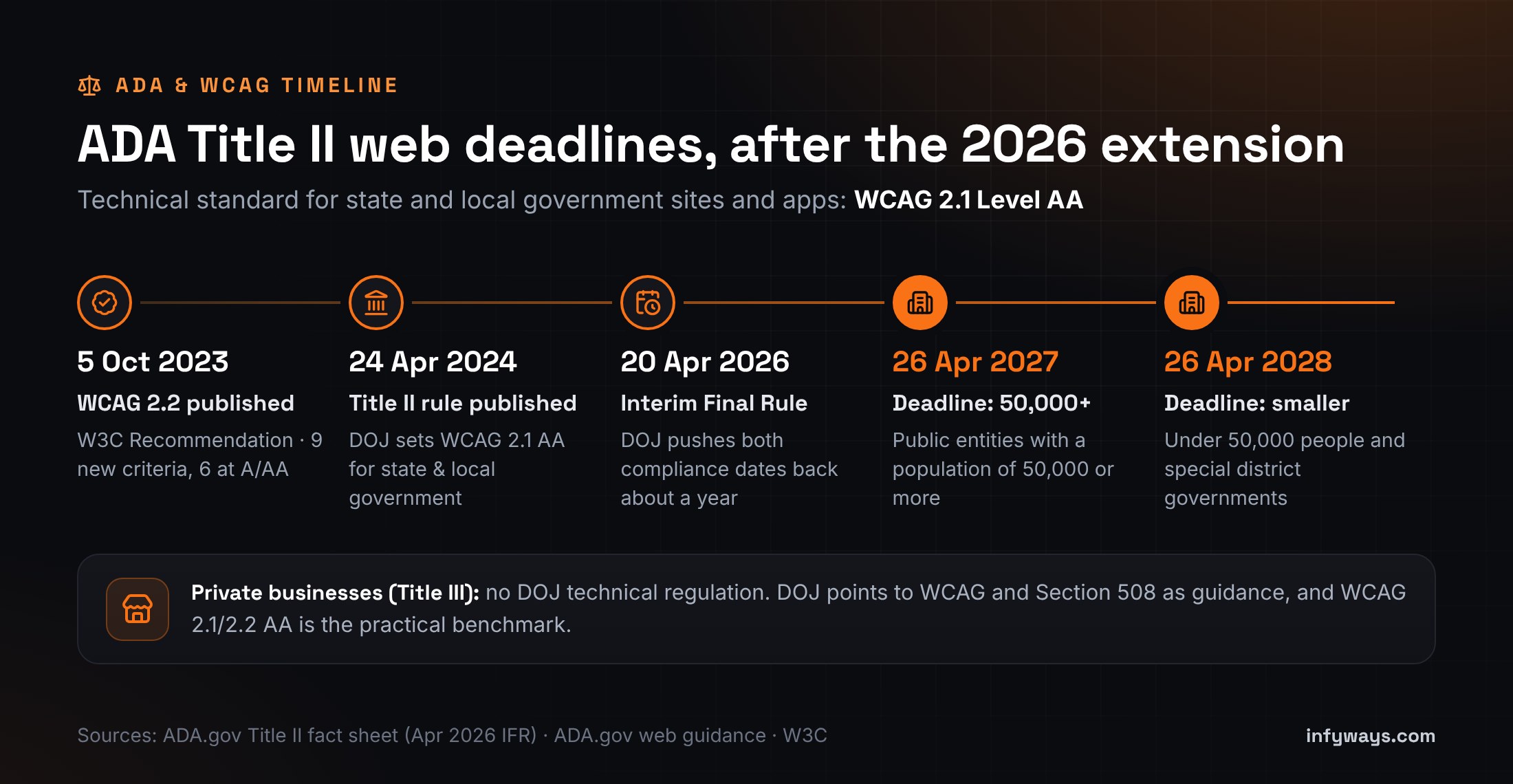
The DOJ final rule was published in the Federal Register on 24 April 2024. It sets WCAG 2.1 Level AA as the technical standard for web content and mobile apps from state and local governments. That includes public schools, colleges and universities, libraries, courts, transit agencies, public hospitals and special districts. An Interim Final Rule published on 20 April 2026 extended the compliance dates:
| Public entity | Compliance date |
|---|---|
| Total population of 50,000 or more | 26 April 2027 |
| Total population under 50,000 | 26 April 2028 |
| Special district governments (any size) | 26 April 2028 |
- Vendors are covered. Content that a contractor builds or posts for a public entity must meet WCAG 2.1 AA. DOJ's own example is a county parks page made by a local web design company. If your agency builds Joomla sites for cities, schools or libraries, your work is in scope.
- Third-party tools the entity adds are covered too: calendars, maps, reservation systems and payment forms.
- School districts use the population of their city or county, or a Census estimate for independent districts, to find their date.
The rule has limited exceptions. Each one has conditions, and none removes the duty to give a person with a disability an accessible version when they ask:
- Archived content: created before the compliance date, kept only for reference, stored in an archive area and unchanged since.
- Preexisting documents: PDFs, Word, presentation and spreadsheet files posted before the compliance date, unless people still use them to apply for or access a service.
- Third-party posts: content posted by members of the public, not by the entity or its contractors.
- Individualised, password-protected documents such as a resident's water bill.
- Preexisting social media posts made before the compliance date.
Title III: businesses open to the public
Title III requires businesses open to the public to give people with disabilities full and equal enjoyment of their goods and services, and DOJ applies that to websites. But DOJ guidance also says the Department "does not have a regulation setting out detailed standards". Businesses have flexibility in how they comply, and DOJ points to WCAG and the Section 508 Standards as helpful guidance. The same guidance page lists DOJ website settlements with businesses including H&R Block, Peapod and Rite Aid.
In practice, WCAG is the benchmark commonly referenced in private ADA website lawsuits, demand letters and settlements. For a US business running Joomla, WCAG 2.1 AA is the minimum sensible target and WCAG 2.2 AA is the better one. Outcomes vary from case to case, so we don't quote lawsuit counts here.
Section 508: federal agencies and their suppliers
Federal agencies follow Section 508 of the Rehabilitation Act. The Revised 508 Standards require electronic content to conform to WCAG 2.0 Level A and AA. A Joomla site built to WCAG 2.1 or 2.2 AA covers those 2.0 criteria as well.
Selling to the EU or UK too?
If you sell to consumers in the EU, the European Accessibility Act can apply wherever your business is based. Our European Accessibility Act guide covers who it applies to, EN 301 549 and the UK rules.
General information, not legal advice. Whether and how the ADA applies to your organisation is a question for a qualified attorney.
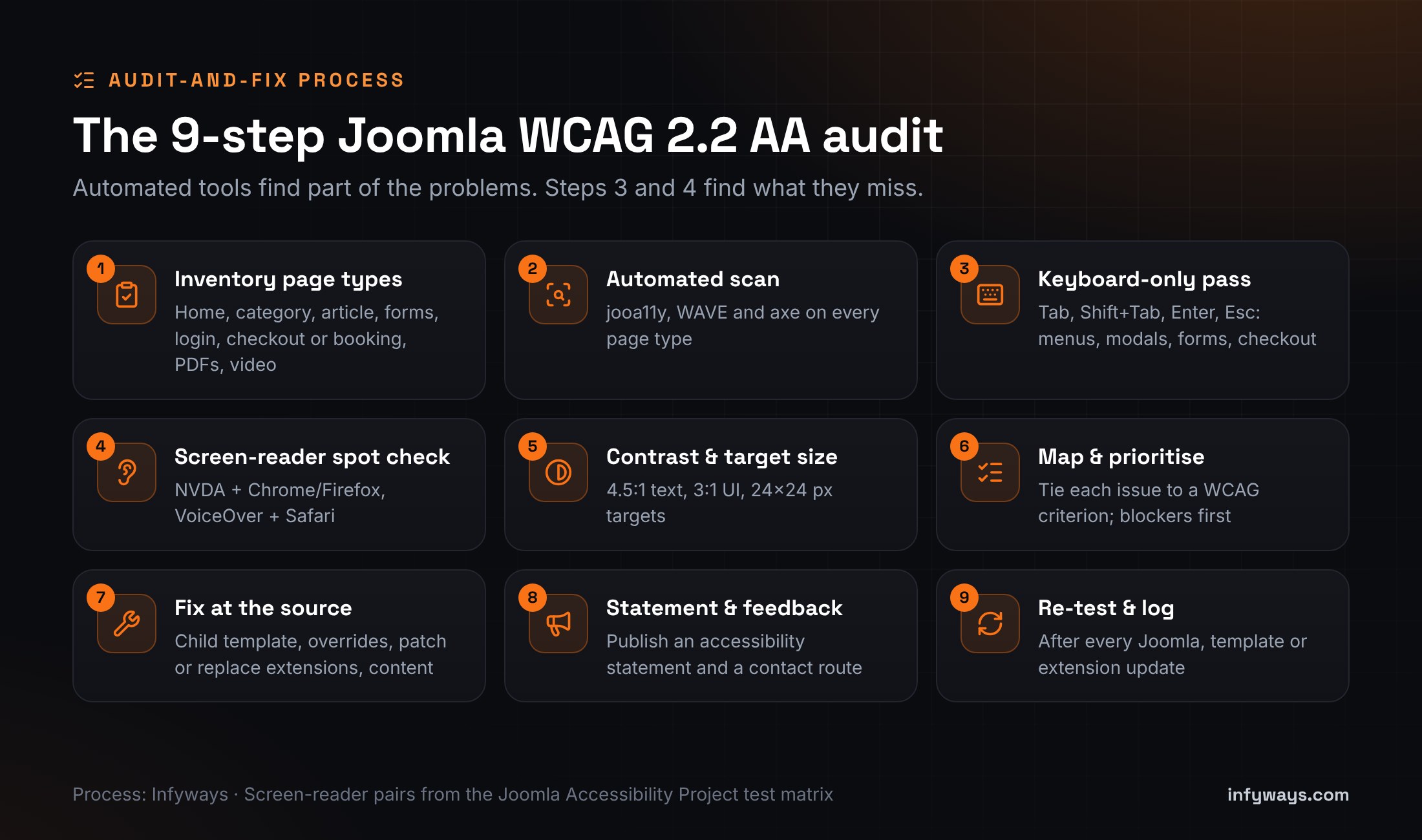
How do you audit and fix a Joomla site for WCAG 2.2 AA?
This is the process we use on Joomla sites for US owners and agencies. It works whether you do it in-house or hire help. The test steps mirror the screen-reader and browser pairs the Joomla Accessibility Project uses for core.
1. Inventory your page types
You don't test 2,000 URLs. You test each type of page and each extension that renders something. List these: home page, category blog and list views, a typical article, contact and other forms, login and registration, search results, checkout or booking, an events calendar if you have one, embedded video and maps, and your most-downloaded PDFs. Note which template layout and which extension produces each one.
2. Run automated scans
- Turn on jooa11y (System → Plugins → "System - Joomla Accessibility Checker"). It has been a core plugin since Joomla 4.1. Use the Accessibility Check button on your key articles. As the Joomla manual says, it identifies problems but doesn't fix them.
- Run WAVE and axe DevTools on every page type from step 1. Our free accessibility checker gives a quick second opinion.
- Export or screenshot the results. They become your baseline.
3. Do a keyboard-only pass
Put the mouse away. Use Tab, Shift+Tab, Enter, Space, the arrow keys and Escape through the menu, search, forms, popups, the cookie banner and checkout. Check that focus is always visible, follows a logical order, never gets trapped, isn't hidden under a sticky header (2.4.11), and returns to the trigger when a modal closes. Our keyboard navigation tester helps you record what you find.
4. Spot-check with a screen reader
Use NVDA with Chrome or Firefox on Windows and VoiceOver with Safari on macOS or iOS. Pull up the headings list and the landmarks. Tab through a form and listen: does every field have a label, and is every error announced? Do icon buttons have names? These are the problems scanners can't judge.
5. Check contrast and target size
Check that normal text has at least 4.5:1 contrast, and that large text, icons, form borders and focus indicators have at least 3:1. Interactive targets should be at least 24×24 CSS pixels or well spaced. Use our free contrast checker for colours and the PDF accessibility checker for documents.
6. Map findings to WCAG and prioritise
Log every issue with its WCAG success criterion, the page type, its severity, and its source: template, extension, content or Joomla core. Fix blockers first, meaning anything that stops someone navigating, logging in, submitting a form or paying. Low-contrast footer text can wait a sprint; an inaccessible checkout can't.
7. Fix at the source
- Template: use a child template and layout overrides, so fixes survive template updates. Our European Accessibility Act guide has the skip-link, focus and contrast snippets.
- Extensions: update first. Ask the vendor about accessibility, for example whether they publish a conformance report (often called a VPAT or ACR). Then patch the output with an override, or replace the extension.
- Content: write real alt text, fix heading order, rewrite "click here" links, add captions and tag your PDFs.
- Joomla core: keep current with Joomla 6.2 updates and work around known core gaps, such as enabling the Skip-To plugin on the site.
8. Publish an accessibility statement and a feedback route
Add an "Accessibility" page linked in the footer. It should say which standard you aim for (for example WCAG 2.2 AA), when you last tested, any known limitations, how to request content in another format, and how to report a problem by email or phone. DOJ guidance notes that a way to report accessibility problems helps site owners fix them. Don't write "fully ADA compliant"; describe what you tested and what you're doing.
9. Re-test after every update and keep a log
Accessibility breaks quietly. A template update, a new slider or a Joomla release can undo past fixes. Re-test the affected page types after each change, have editors run jooa11y before they publish, and keep a dated log of what you tested and fixed. If a complaint arrives, that log shows your good-faith work.
Which tools should you use to test a Joomla site?
Use automated tools to find the easy problems fast, then use people to find the rest:
| Tool | Cost | Best for | Limits |
|---|---|---|---|
| jooa11y (Joomla Accessibility Checker) | Free, in core since Joomla 4.1 | Article content: alt text, headings, link text, captions, PDF links | Checks content, not your whole template; finds problems, doesn't fix them |
| WAVE (WebAIM) | Free browser extension | Visual markers on the page; good for learning | Automated checks only |
| axe DevTools (Deque) | Free extension, paid tiers | Developer-grade rule checks for each page type | Automated checks only |
| Lighthouse | Built into Chrome | A quick accessibility score next to performance and SEO | A subset of checks; a perfect score doesn't mean the site is accessible |
| Keyboard test | Free | Focus order, traps, menus, modals, checkout | Needs a person |
| NVDA / VoiceOver | Free | What screen-reader users actually hear | Takes some practice |
| Infyways free tools | Free | Contrast, keyboard and PDF spot checks; more on our accessibility tools page | Spot checks, not a full audit |
"A 'clean' report does not necessarily mean everything is accessible." The US Department of Justice, in its web accessibility guidance, which recommends pairing automated checkers with a manual check.
You'll see many different percentages quoted for how much automated tools catch. The estimates vary with the method, and we haven't found a primary source we trust, so we don't quote one. The practical rule holds either way: scan first, then test by hand.
Do overlays or a "Joomla ADA plugin" make your site compliant?
No. An overlay adds a script and a toolbar on top of your page. It doesn't change the template, extension or content that actually fails. Regulators have acted on claims like these. In January 2025 the US Federal Trade Commission proposed an order requiring accessiBe to pay $1 million over claims that its accessWidget could make any website WCAG-compliant. The FTC approved the final order on 22 April 2025. It bars the company from claiming its automated products can make any website WCAG-compliant, or keep it compliant over time, unless it has evidence to support the claim. DOJ's guidance makes the same general point: automated checkers and overlays "need to be used carefully".
Visitor toolbars can still help some people with text size, spacing, contrast or a reading guide. Joomla core even ships one, the "Additional Accessibility Features" plugin. As the Joomla Community Magazine notes, it doesn't solve any accessibility problem your site has. Treat a toolbar as a comfort feature on top of an accessible site, not as a fix.
So what is the best Joomla accessibility plugin?
It depends on the job, because each type of tool does a different one:
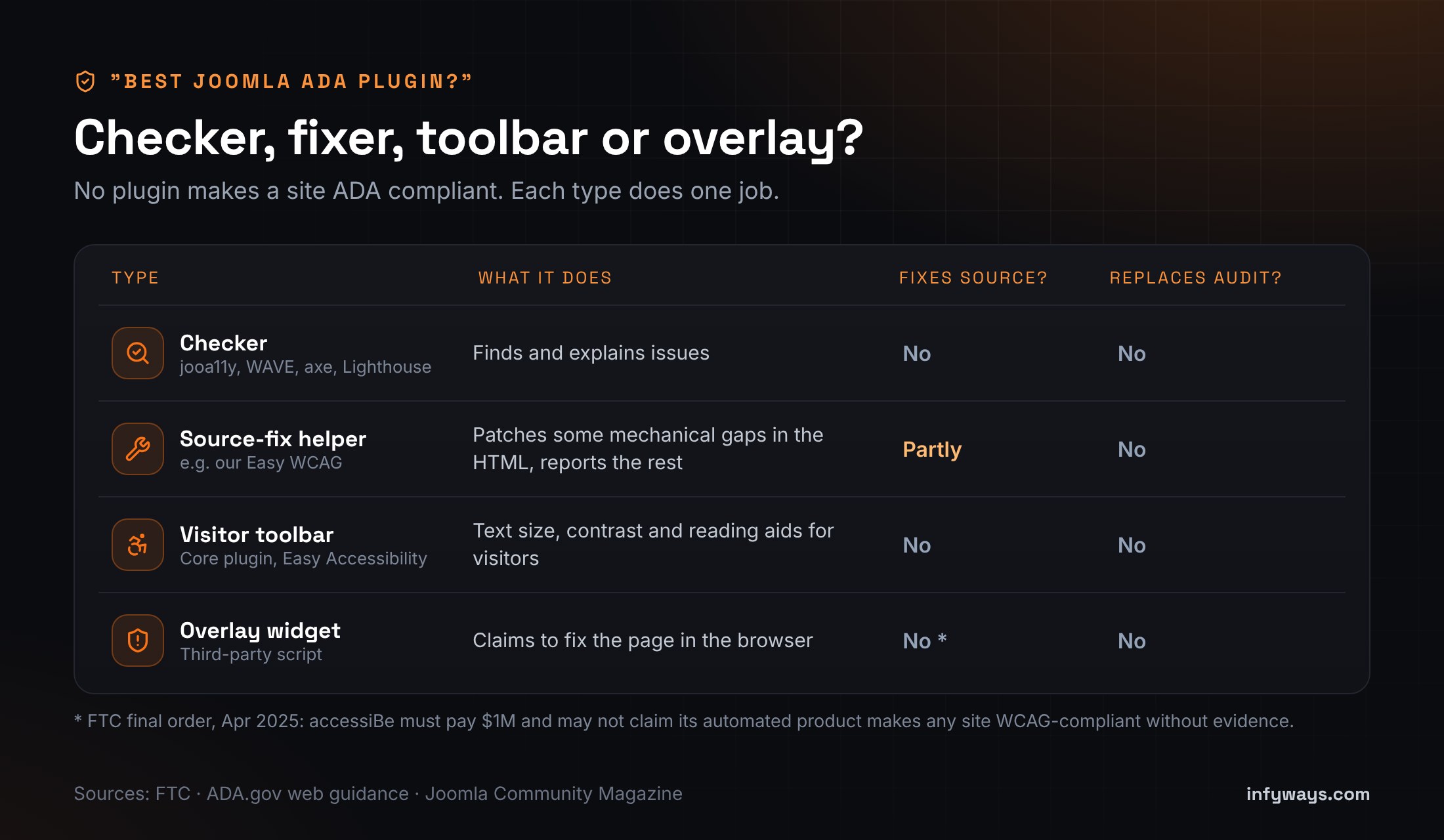
- To find issues: jooa11y (free, in core), plus WAVE and axe.
- To patch mechanical gaps: self-hosted helper plugins that fix the HTML your site sends. For example, our own Easy WCAG (we make it, so weigh that) adds missing
lang,altand iframe titles, labels icon links and form fields, adds a skip link and reports what still needs a person. It doesn't replace an audit. - To give visitors preferences: a self-hosted toolbar, such as Joomla's core plugin or our Easy Accessibility module. It's useful for comfort, but it isn't a compliance tool.
- To avoid: anything that promises "instant ADA compliance" or a compliance certificate.
When should you bring in a Joomla accessibility team?
A small brochure site on the default template can often work through the checklist above in-house. It's worth getting help when:
- You're a public entity, or a vendor to one, facing the April 2027 or April 2028 Title II date on a large site.
- Your site uses a third-party template or page builder, or lots of extensions.
- You run checkout, booking, membership or application forms, where one barrier blocks a whole task.
- You have years of PDFs and media to triage.
- You also need to upgrade to Joomla 6.2. Fixing accessibility during the upgrade avoids doing the template work twice.
Infyways has been around since 2010 and makes 125 Joomla extensions, so we know how templates and extensions render under the hood. Our Joomla development team audits against WCAG 2.2 AA (mapped to 2.1 AA for Title II), fixes templates and overrides, repairs or replaces extensions, cleans up content and PDFs, drafts your accessibility statement and re-tests after the fixes. We often pair this with performance optimisation, because clean, well-structured pages also tend to load faster. We don't sell certificates or legal guarantees. We remove barriers and document the work.
Tell us your site and deadline; a senior engineer replies within 12 hours. Prefer to add capacity to your own team? See how to hire Joomla developers.
Sources we checked (October 2026)
- W3C: What's New in WCAG 2.2
- ADA.gov: Title II web and mobile app rule fact sheet, with the April 2026 Interim Final Rule dates
- ADA.gov: Guidance on Web Accessibility and the ADA (Title III position)
- U.S. Access Board: Revised 508 Standards
- Axess Lab: Joomla! WCAG Audit report (17 August 2026) and the Joomla Community Magazine summary
- Joomla Accessibility Project: Milestone 1b and milestone status
- FTC: proposed accessiBe order (January 2025) and final order (April 2025)
- Joomla 4.1 release: jooa11y and the Joomla manual on the Accessibility Checker
Frequently Asked Questions
Is Joomla ADA compliant?
No CMS is ADA compliant on its own. Joomla 5 and 6 aim for WCAG 2.1 AA in core and ship an accessible default template and a built-in checker. But your template, extensions and content decide whether your site meets WCAG, which is the benchmark ADA rules and settlements use.
Is Joomla WCAG 2.2 compliant?
Not fully yet. An independent WCAG 2.2 AA audit of Joomla core by Axess Lab, released on 17 August 2026, found 42 issues (4 critical) and 27 failed success criteria. The Joomla Accessibility Project is now turning them into a remediation plan and core fixes.
What WCAG level does the ADA require?
For state and local governments, the DOJ Title II rule requires WCAG 2.1 Level AA. For private businesses under Title III, DOJ has no technical regulation. It points to WCAG and Section 508 as guidance, and WCAG 2.1 or 2.2 AA is the commonly used benchmark.
When is the ADA Title II website deadline?
After DOJ's Interim Final Rule of 20 April 2026, the deadline is 26 April 2027 for public entities with a population of 50,000 or more. It's 26 April 2028 for smaller entities and all special district governments.
Is there a Joomla ADA or WCAG plugin that makes my site compliant?
No plugin can guarantee compliance. The built-in jooa11y checker finds content issues, and self-hosted helpers can patch some mechanical gaps such as missing alt text or labels. Templates, forms and content still need manual fixes and testing.
Do accessibility overlays work?
They can add visitor preferences, but they don't fix your site's underlying code. In April 2025 the FTC finalised an order requiring accessiBe to pay $1 million over claims that its widget could make any website WCAG-compliant.
How do I check my Joomla site's accessibility?
Run jooa11y on your articles and WAVE or axe on each page type. Then test everything by keyboard and spot-check with NVDA or VoiceOver. Automated tools find only part of the issues, so the manual checks matter most.
Does the European Accessibility Act apply to my US Joomla site?
It can. If you sell covered services, such as online shopping, to consumers in the EU, the EAA can apply wherever you're based. See our Joomla European Accessibility Act guide for details.
Disclaimer: This article is general information about US and international accessibility standards as of October 2026. It is not legal advice, and following it does not guarantee compliance with the ADA or any other law. Check your obligations with a qualified attorney.